
Shopify App Development: Cost, Timeline, and What to Build First
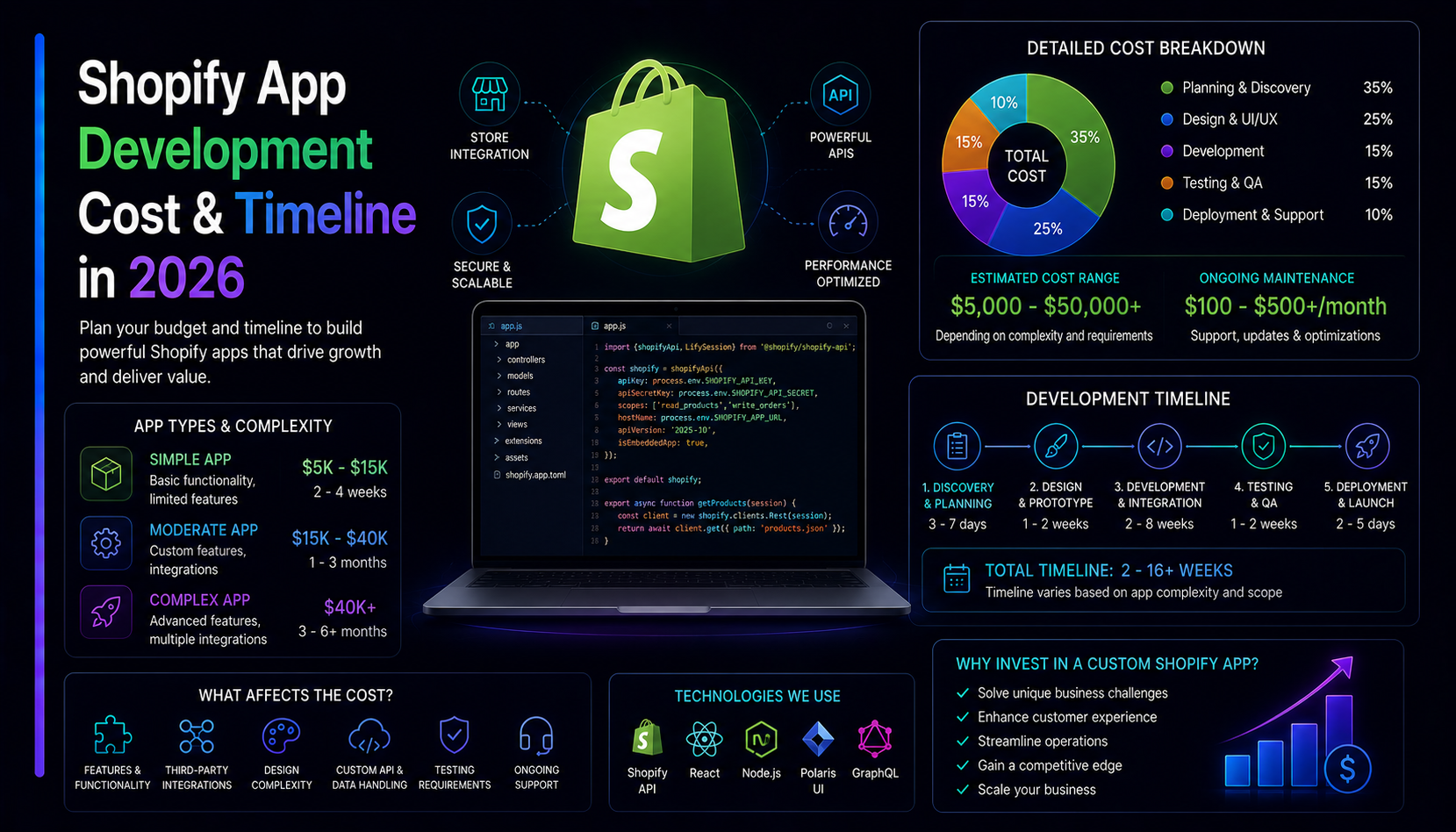
Building a Shopify app in 2026 — whether a public app listed on the store or a private app built for a single merchant — is a well-understood engineering problem with a clear development model, a defined billing API, and a review process that rewards doing it properly. Here is what it actually costs, how long it takes, and the single most important decision you make before writing a line of code.
Public app vs private app: decide this first
This is the decision that shapes everything else. A public app is listed on the Shopify App Store and available to any merchant who installs it. A private app (or custom app) is built for one specific store and never publicly listed.
Public apps must pass Shopify's review process, follow strict API usage policies, and handle billing through Shopify's built-in billing API. They are worth building if you are creating a product for the merchant market. Private (custom) apps have fewer constraints, skip the App Store review, and are the right choice when you are solving a specific workflow problem for a single store without intending to sell to other merchants.
How Shopify app architecture works
A Shopify app has two parts: the Shopify side (an OAuth-authenticated connection to the merchant's store, access to the Storefront and Admin APIs) and your side (a backend that handles authentication, stores data, and contains your application logic). Modern Shopify apps use App Bridge and Polaris for the embedded admin UI and Node.js or another server framework on the backend. The Shopify CLI and official app template handle the boilerplate; from there you are building a standard web application that talks to Shopify's API.
What drives Shopify app development cost
Admin UI complexity
A simple settings screen — a few fields, a toggle, a save button — takes very little time to build using Shopify's Polaris design system. A complex multi-page dashboard with charts, data tables, bulk actions, and real-time updates takes significantly more. Polaris handles most standard UI patterns, which cuts time versus building from scratch, but complex logic still takes time to build and test correctly.
Storefront integration
Many apps need to inject UI or behavior into the merchant's storefront: a floating button, a banner, a custom widget, or a checkout extension. Shopify's App Blocks system (for Online Store 2.0 themes) and Checkout Extensions are the correct tools — they survive theme updates and do not require merchants to edit Liquid code. Building storefront extensions adds engineering scope, especially for complex interactions across multiple page types.
Webhooks and event processing
If your app needs to react to events in the merchant's store — an order placed, a product updated, a customer registered — you consume Shopify webhooks. Processing them reliably in production, with retry logic, idempotency, and HMAC validation, is genuine engineering work that adds to the timeline.
Billing implementation
Shopify's built-in billing API handles subscriptions, one-time charges, and usage-based billing for public apps. Implementing it correctly — including trial periods, plan upgrades and downgrades, and the mandatory billing confirmation flow — adds engineering scope but is the right way to bill merchants. It keeps everything inside Shopify admin and earns merchant trust.
Realistic cost and timeline bands
Simple App Embed or private app — 1 to 3 weeks
A focused app that does one thing: injects a widget into the storefront (like our WhatsApp Floating Button), syncs a single data field, or adds a simple checkout customization. Minimal backend, straightforward OAuth, one or two admin settings screens. The cheapest and fastest Shopify build — and the right scope for most merchant-specific workflow tools.
Mid-range public app — 4 to 10 weeks
A full public app with a meaningful admin dashboard, storefront extensions, webhook processing, the billing API, proper session management, and a review-ready codebase. This is the right scope for a product you want to list on the App Store and sell to merchants. The billing implementation and the App Store review process both add time compared to a private app build.
Complex merchant platform — 10+ weeks
A multi-feature app with complex merchant-facing analytics, custom reporting, deep order management, cross-app integrations, or multi-store support. Treat this as a full SaaS product that happens to live in the Shopify ecosystem, and scope it accordingly.
The merchants who get the most out of custom Shopify apps are the ones who invest time defining the spec before the build. The failure mode is a vague brief that turns a four-week project into an eight-week one as requirements crystallize mid-development.
The Shopify App Store review process
Shopify reviews every public app before it goes live. The review checks that the app follows their developer policies, uses APIs correctly, handles merchant data properly, and provides a quality merchant experience. Common rejection reasons include requesting more API access than the app needs, a missing privacy policy, a non-functional demo store, or a thin App Store listing with poor screenshots.
Review time is typically one to two weeks. A well-built, policy-compliant app usually clears on the first submission. We have taken our own WhatsApp Floating Button through this process and have a good sense of what reviewers look for.
Shopify's revenue share for public apps
Public apps on the Shopify App Store are subject to revenue share: Shopify's revenue share has changed over the years (at the time of writing, the first USD 1 million in lifetime app revenue is exempt and 15% applies beyond that), so check the current Partner Program terms. Factor this into your pricing model when deciding whether a public app makes commercial sense or whether building a private app for a specific client is a better structure.
App vs theme customization: which is right?
A theme customization is code that lives in the merchant's Liquid theme. It is fast to build but fragile — a theme update can break it, and moving it to another store requires copying files. An app is more resilient: it installs cleanly, survives theme updates when you use App Blocks, and uninstalls cleanly leaving no theme residue. For anything merchants configure, rely on, or expect to work across future theme changes, an app is the correct tool. We cover this on our Shopify development services page.