
WordPress Cookie Consent: A GDPR and UK Setup Guide (Free)
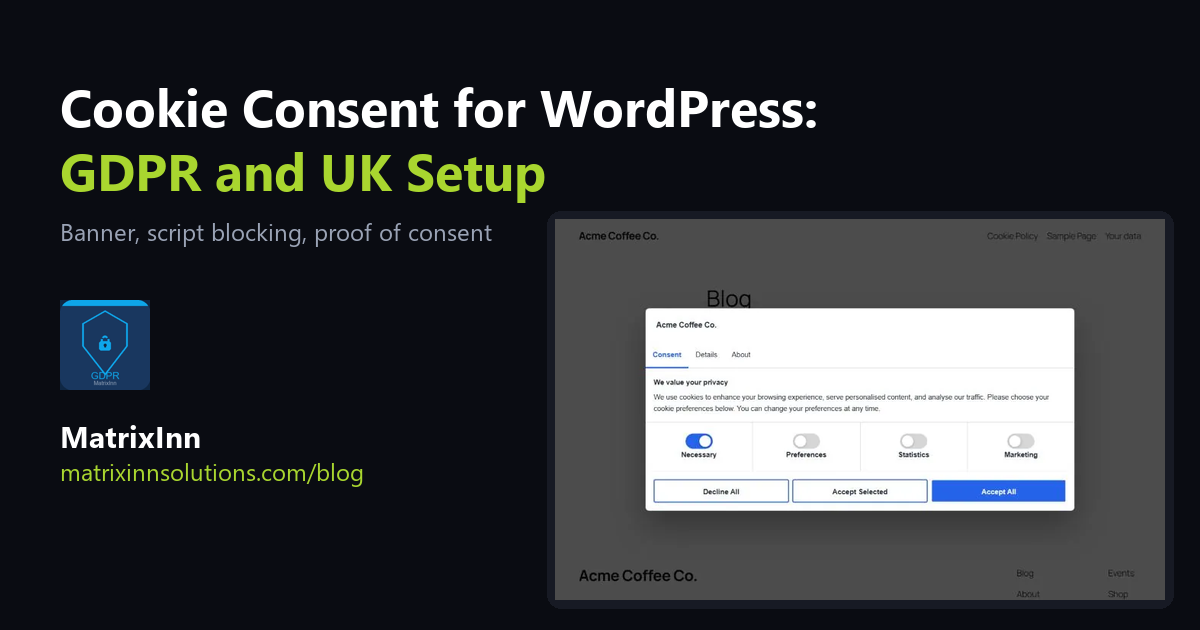
If your WordPress site has visitors from the EU or the UK, a cookie banner is not just decoration. Under GDPR and the UK's PECR rules you generally need a visitor's consent before setting cookies that are not strictly necessary, such as analytics or advertising cookies, and you should be able to show that they gave it. This guide explains what a proper WordPress cookie consent setup needs and how to build it for free.
One honest note first: we are a software company, not lawyers. This article explains how the tools work. It is not legal advice, and how the law applies depends on your site, your visitors and what your scripts do. Check your own cookie lists and wording, or ask a qualified adviser.
What a Cookie Consent Setup Needs
- A banner that asks before non-essential cookies are set. Accept, decline and "choose" should be equally easy to press. A banner that only says "OK" is not a choice.
- Categories. Visitors should be able to allow some kinds of cookies and refuse others: Necessary (always on), Preferences, Statistics and Marketing.
- Scripts that really wait. The banner means nothing if Google Analytics, Meta Pixel or other tags have already run. They must not start until the matching category is allowed.
- A way to change the decision later. A visitor must be able to withdraw consent as easily as they gave it.
- A record of consent. If you are asked to prove that a visitor consented, you need the date, the choices and the version of the policy they saw.
- A cookie policy. A page that lists the cookies your site uses, what they are for and how long they last.
Step 1: Find Out What Your Site Sets
Before you install anything, list the cookies your site really uses. Open your site in a private window, open the browser's developer tools, go to the Application tab (Chrome) and look under Cookies. Click "Accept" on any banner, browse a few pages and look again. Common sources are Google Analytics, Meta Pixel, embedded YouTube videos, live chat, payment providers and contact form plugins. Anything you do not use should not be in your policy, and anything you use must be.
Step 2: Set Up the Banner With a Free Plugin
We built MatrixInn GDPR & UK Compliance, free on WordPress.org. It runs entirely on your own site: no external service, no account and no subscription.
- Go to Plugins → Add New, search for MatrixInn GDPR, install and activate.
- Open GDPR Compliance in the admin menu.
- Under Cookie Categories, list the cookies your site sets (from Step 1) and untick the categories you do not use.
- Under Appearance, choose a layout (centre popup, bottom bar or corner box), your own title, message, button labels, colors and logo.
- Under Cookie Policy, enter your business details and click Create Cookie Policy page.
The banner has three tabs (Consent, Details with a full cookie declaration, and About), and Accept all, Accept selected and Decline buttons that carry equal weight. It is keyboard accessible and works on phones, and the front end does not load jQuery.
Step 3: Make Your Scripts Wait for Consent
This is the part most sites get wrong. There are two cases:
Google tags (Analytics, Ads)
The plugin supports Google Consent Mode v2, switched on by default for new installs. It denies all Google storage types at the top of the page head, before your Google tags run, and then updates analytics_storage, ad_storage, ad_user_data, ad_personalization, functionality_storage and personalization_storage from the visitor's choice. Returning visitors' choices apply immediately on every page.
Other scripts (Meta Pixel, chat widgets, anything else)
Change the script tag so the browser does not run it, and tell the plugin which category it belongs to:
<script type="text/plain" data-minn-category="marketing">
  // your tracking code here
</script>
It only runs after the visitor allows that category. Use statistics, preferences or marketing as the category value.
After setting this up, test it: open a private window, do not click anything on the banner, and check in the developer tools that the cookies and network requests you marked as optional have not appeared. Then accept and check that they do.
Step 4: Proof of Consent
Every decision is logged in your own database: the categories, date and time, page, policy version and IP address, which is anonymised by default. The Consent Logs screen shows totals and a detailed table, and you can download a CSV. This also works on sites that use page caching, because the records are sent through the WordPress REST API rather than a nonce that expires. Records of logged-in users are included in WordPress's personal data exports and erasures.
The visitor's own choice is stored in their browser in a first-party cookie called minn_gdpr_consent (365 days by default). A floating cookie button lets them change or withdraw it at any time, and so does any link with the class minn-gdpr-open or a link to #cookie-settings.
Step 5: The Cookie Policy Page
The plugin generates and publishes a Cookie Policy page from your business details, your active categories and your cookie lists. UK businesses get UK GDPR and PECR wording and an ICO complaint link. When you publish a new version you can ask visitors to consent again. If your policy page is built with Elementor or another page builder, add the shortcode [matrixinn_gdpr_cookie_policy] in a Shortcode widget so it always shows the current policy.
What About Data Requests?
Under GDPR people can ask for a copy of their data or ask you to delete it. The shortcodes [matrixinn_gdpr_export] and [matrixinn_gdpr_erasure], placed on your privacy policy page, let a visitor make the request. It uses WordPress core's privacy tools: the visitor confirms by email and you process the request under Tools → Export / Erase Personal Data.
Common Mistakes
- A banner that does not block anything. If Analytics and pixels load before the visitor answers, the banner is cosmetic.
- A bigger Accept button than Decline. Make the choices equal.
- No way to change your mind. Keep the settings button visible.
- A copied policy. A cookie policy that lists cookies your site does not use (or misses ones it does) is worse than a short, accurate one.
- Forgetting embeds. YouTube, maps and social buttons set cookies too.
- Behind a proxy or Cloudflare. Consent records use the connecting IP. If your host does not pass the real visitor IP, the plugin has a
minn_gdpr_client_ipfilter to read your proxy's header.
Frequently Asked Questions
Is the plugin free?
Yes. Everything described here is in the free plugin on WordPress.org, with no account, no subscription and no external service.
Does it block Google Analytics before consent?
With Google Consent Mode enabled, which is the default for new installs, Google tags start in "denied" mode and only store cookies after consent. For other scripts, use the type="text/plain" data-minn-category method above.
Does it work with page caching?
Yes. The banner and consent state run in the browser, and consent records go to the WordPress REST API, which is not cached.
Is a cookie banner enough to be GDPR compliant?
No. Cookie consent is one part of it. You also need a privacy policy, a legal basis for the data you collect, a way to answer data requests, and careful choices about which services you use. The plugin gives you the tools for the cookie part; a qualified adviser can tell you what else applies to your site.
Running a shop with Cash on Delivery? See our COD Checkout Rules for WooCommerce. And if your site needs custom privacy features, such as consent handling for a custom app or a multi-site setup, tell us about it.