
MatrixInn GDPR: WordPress Cookie Consent
A free, self-hosted cookie consent plugin for GDPR, UK GDPR and PECR — a clear tabbed banner, proof-of-consent logs, a Cookie Policy generator, data request forms and Google Consent Mode v2. Everything you need to collect, manage and show consent, in one plugin.
Guide: WordPress cookie consent: a GDPR and UK setup guide →
Everything for cookie consent, in one plugin
From the first banner to a record you can show a regulator — MatrixInn GDPR covers the whole consent lifecycle.
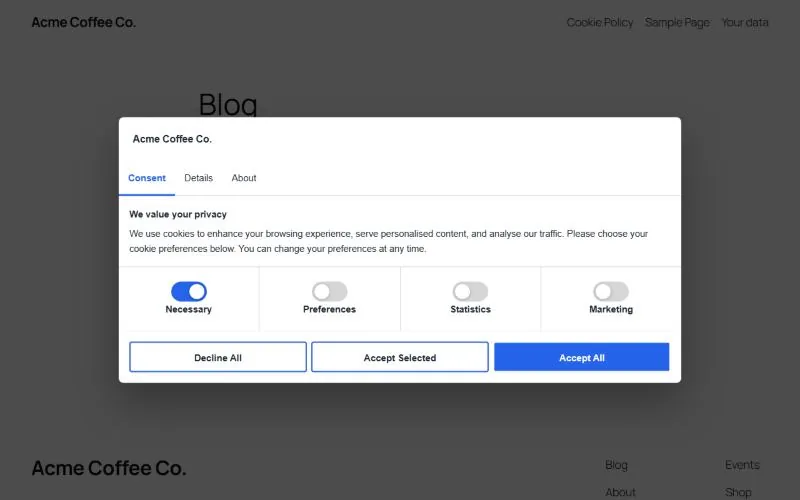
Tabbed consent banner
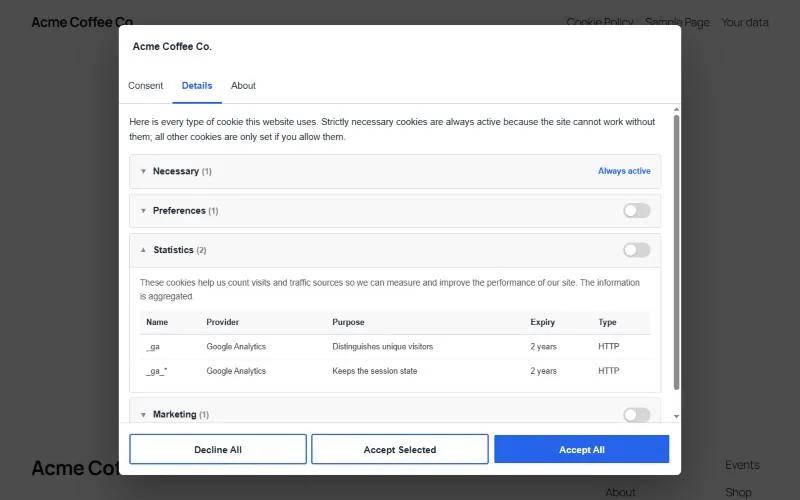
Consent, Details and About tabs with equal-weight Accept all, Accept selected and Decline buttons. Choose a centre popup, bottom bar or corner box.
Four consent categories
Necessary (always on), Preferences, Statistics and Marketing. Hide any category your site does not use, and list each cookie with provider, purpose and expiry.
Google Consent Mode v2
All six Google signals start as denied at the very top of the page, before your tags run, and update the moment a visitor chooses — including returning visitors.
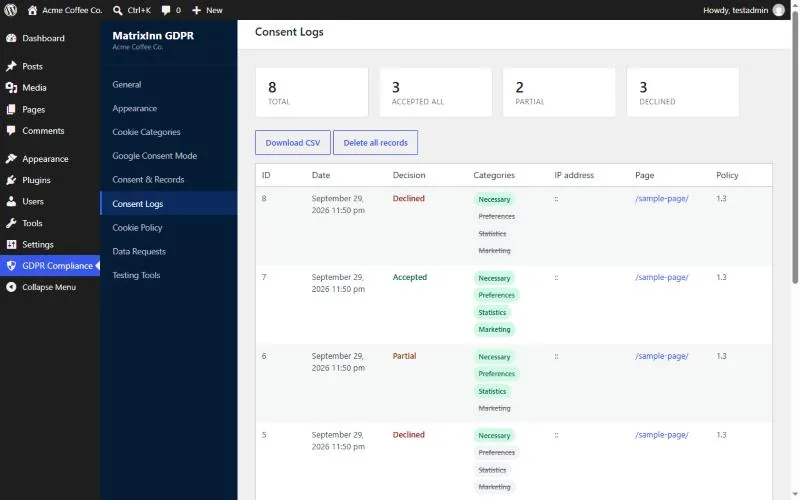
Proof of consent
Every decision is logged with categories, date, page, policy version and an anonymised IP. View totals and records in WordPress, or download them as CSV.
Cookie Policy generator
Creates a Cookie Policy page from your business details and cookie lists, with UK GDPR / PECR wording for UK businesses. Style it to match your site, or drop the shortcode into Elementor.
Data export & erasure forms
Shortcodes for access and erasure requests. Visitors confirm by email and requests arrive in Tools → Export / Erase Personal Data.
Your brand
Set the accent colour, text colour, logo (or hide it) and every piece of banner text from the WordPress admin — no code required. Works with Elementor, Astra, GeneratePress, Kadence, OceanWP and block themes.
Script blocking
Mark non-Google scripts (Meta Pixel, Hotjar and others) with a data attribute and they run only after the visitor allows that category.
See it in action
Up and running in five minutes
- Install MatrixInn GDPR & UK Compliance from Plugins → Add New and activate it.
- Open GDPR Compliance → Cookie Categories, list the cookies your site sets, and untick categories you don’t use.
- Under Appearance, pick a layout and your accent colour.
- Under Cookie Policy, add your business details and click Create Cookie Policy page — or, on an Elementor page, add a Shortcode widget with
[matrixinn_gdpr_cookie_policy]. - Add
[matrixinn_gdpr_export]and[matrixinn_gdpr_erasure]to your Privacy Policy page for data requests.
Works on any modern WordPress site
Release history
A small, dismissible review request for administrators, shown after a week of use and only on the Dashboard, Plugins and plugin screens. "Maybe later" snoozes it for 30 days; "Don't ask again" hides it for good.
Show or hide the logo row (with an optional background for white logos), style the Cookie Policy content — font, sizes, text, heading, link and table colours — and embed the always-current policy in Elementor or any page builder with the [matrixinn_gdpr_cookie_policy] shortcode. The policy no longer repeats its title under the page heading.
Banner buttons, tabs and the cookie-settings button can no longer be restyled by themes that style every button (such as Hello Elementor).
New tabbed banner with a full cookie declaration, per-category cookie lists, accent colour and logo settings, three layouts, consent log CSV export, working data export/erasure request forms, script blocking, and Google Consent Mode v2 defaults that load before your tags. Settings, consent records and visitors' existing choices carry over from 1.x.
Maintenance releases 1.0.1–1.0.7: layout, settings-saving and theme compatibility fixes.
Initial release — cookie consent banner, category preferences, Google Consent Mode v2, consent logging and Cookie Policy generator.
Common questions
Is MatrixInn GDPR free?
Yes. The plugin is free on WordPress.org, with no account, subscription or external service — everything runs on your own site.
Does it block Google Analytics until visitors consent?
With Google Consent Mode enabled, Google tags start with every storage type denied and only store cookies after consent. Other scripts can be held back with type="text/plain" and a data-minn-category attribute.
Does it work with page caching?
Yes. The banner and the visitor's choice are handled in the browser, and consent records are sent to the WordPress REST API, which is not cached.
I use version 1.x — will updating break anything?
No. The plugin stays active, and your banner text, logging, policy and business settings, consent records and visitors' existing choices are all kept. Only the banner design changes.
Does installing it make my site GDPR compliant?
It gives you the tools — consent collection, records, a policy page and data request forms — but compliance also depends on which cookies your site uses and how you describe them. It is not legal advice.
Questions or setup help?
We’re happy to help you install, configure, and verify your consent setup. Reach the team directly and we’ll reply within one business day.
info@matrixinnsolutions.com