
How Much Does a Mobile App Cost in 2026? The Full Breakdown
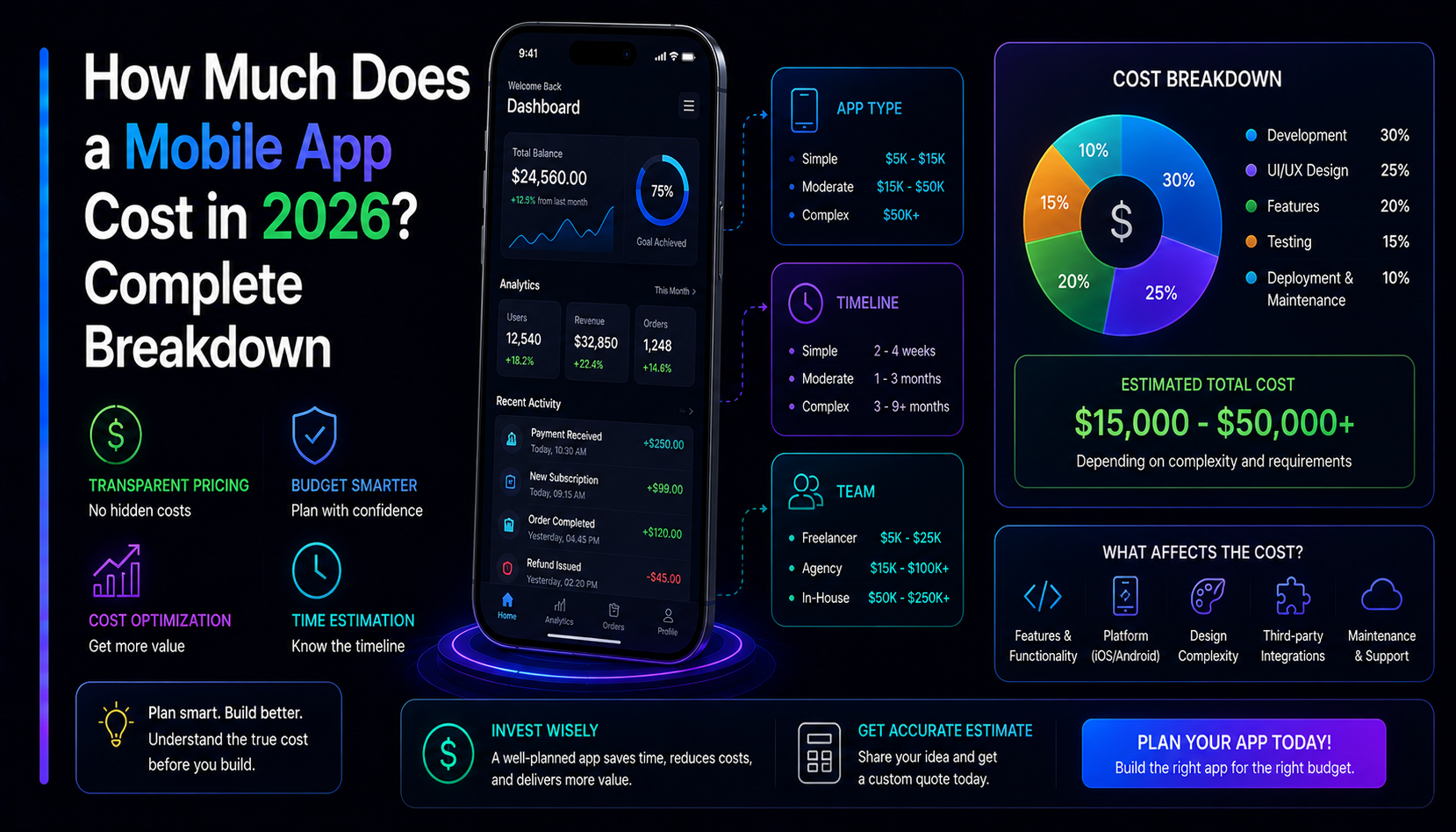
The most common question about app projects is some version of: "so how much does an app actually cost?" The honest answer is that it depends — but that's not a cop-out. It depends on five specific things, and once you name those five things you get a real number, not a range so wide it's useless. Here is the full breakdown of mobile app development cost in 2026 — what drives it, realistic bands by scope, and how to build for less without building less.
Why every estimate you read is different
App development estimates on the internet range from "$5,000" to "$500,000" for ostensibly similar apps. The reason is that developers are quoting different things. Some quote a single platform, some quote both. Some quote an MVP, some quote a full version-one product. Some include design, QA, and app-store submission; others quote only code. Before any number means anything, you need a spec that pins down what is in scope.
The five things that drive mobile app development cost
1. Platforms: iOS, Android, or both
Building native iOS and Android separately means two codebases, two submission processes, and roughly double the development time. Cross-platform frameworks like React Native and Flutter solve this by writing once and deploying to both, typically cutting platform cost significantly — though complex platform-specific features (advanced camera processing, deep hardware access) still need native code. For most consumer and business apps, React Native or Flutter is the right call in 2026. Native-only makes sense when you are building something that pushes the platform's limits: advanced AR, real-time audio processing, or a game with demanding graphics.
2. Features and complexity
Features are the biggest line item. A simple app with a few screens and no backend is cheap. An app that needs user accounts, real-time data sync, payments, push notifications, and third-party integrations is a completely different build. The cost lives in the data layer and the integrations, not the number of screens. Two apps can look identical in a mockup and differ by months of engineering work.
3. Design
Good mobile UI/UX design is not a commodity. A professional full-product design — user flows, wireframes, high-fidelity screens, a component library — typically runs three to six weeks for a mid-sized app. That work is what separates an app that gets one-star reviews for being confusing from one that retains users. Do not cut design to save on development; you will pay for it in user drop-off and rework.
4. Backend and integrations
If your app needs to store user data, sync across devices, process payments, or talk to any external service, you need a backend: a server, an API, a database, and all the auth, security, and scaling logic that comes with it. A backend is frequently the largest single line item in an app budget — it is where complexity compounds. An app with no backend (local data only) is significantly cheaper than one with full accounts and real-time sync.
5. Team location and structure
A developer in the US or UK bills at a different rate than a developer in Eastern Europe or South Asia. A boutique product studio bills differently than a large agency or a solo freelancer. None of these is automatically right — you are trading cost, speed, communication overhead, and accountability. An experienced team that ships clean code is cheaper in the long run than a cheap team that ships code you will rewrite in six months.
Realistic cost bands in 2026
Treat these as scope tiers rather than fixed quotes — your actual number depends on the specification.
Simple app — about 4 to 8 weeks
A focused, single-purpose app: a handful of screens, local data storage only, basic UI. Think a branded content viewer, a simple calculator or tool, or a companion app for an existing service. No accounts, no real-time sync, no backend. The fastest and cheapest band — and the right starting point for validating whether users want the thing before building the thing they actually need.
Mid-range app with backend — about 8 to 16 weeks
User accounts and authentication, a REST or GraphQL API, push notifications, third-party integrations (payments, maps, social login), and a polished UI across iOS and Android. This is the most common scope for a real consumer or business app. The backend and the integrations are where the time lives — not the number of screens you see in the mockup.
Complex app with advanced features — 16+ weeks
Real-time features (chat, live updates, collaborative editing), heavy third-party integrations, advanced hardware access (camera ML, AR, Bluetooth), a custom design system, or a large multi-role platform. This band behaves like building a small SaaS product that happens to run on a phone, and it should be scoped and priced accordingly. Do not start this band without a fully signed-off specification.
The single biggest source of cost overruns in app projects is a spec that changes during development. A week of careful spec work before you start saves three weeks of rework mid-build.
iOS vs Android: which platform first?
The practical answer for most startups: start with iOS if your target users are in North America, Western Europe, or Australia — iPhone dominance in those markets means your early adopters are there. Start with Android if you are targeting India, South Asia, Latin America, Southeast Asia, or Africa — Android is the dominant platform in high-growth mobile markets. If you genuinely do not know your users yet, start with iOS; the user feedback tends to be more structured and the App Store review process is more predictable.
How to reduce cost without reducing quality
- Start with one platform. Launch on iOS or Android first, validate with real users, then build the second platform. This cuts the initial platform cost roughly in half.
- Use cross-platform from the start. React Native or Flutter built correctly is indistinguishable from native for most apps. Do not go native on both platforms without a specific technical reason.
- Write the spec before you quote. Vague briefs get padded estimates. A tight spec produces a real number and no surprise change orders later.
- Defer non-core features. Push notifications, social login, in-app purchases, and analytics are real costs. None of them validate your core value proposition. Ship without them and add them when the core is proven.
- Use managed backend services. Supabase, Firebase, Clerk — managed backend services dramatically reduce backend build time. Building your own authentication from scratch in 2026 is rarely the right call.
App stores and ongoing costs
The build is one cost; operating it is another. Apple charges a $99/year developer account fee and takes 15–30% of in-app purchases and subscriptions. Google charges a one-time $25 registration fee and takes 15–30% of purchases. Beyond the stores: hosting the backend, third-party service costs (payments, maps, push notifications), and ongoing maintenance as iOS and Android versions update. Budget at least 15–20% of the initial build cost per year for maintenance and updates — more if you are shipping new features regularly.
How to get a real quote
A real fixed-bid quote requires a real specification. At MatrixInn, every engagement starts with a scoping call and a written brief — we turn that into a fixed price and timeline so you know the number before a single line of code is written. Read more about how we work on our mobile app development services page, or send us a brief.